AI Project Management
AI for Team Leaders: 10 Plays That Buy Back Time and Money
It's Sunday evening. You're rebuilding the weekly status deck from twelve Slack threads, three task boards and a half-remembered standup. By the time it's done, it's already stale, and the one task that will actually sink your launch is sitting in there marked "90% complete." For the fourth week in a row.
This is where AI for team leaders earns its keep. Not by writing the deck faster, but by noticing that task three weeks earlier. Most advice on AI in project management stops at "summarize your meeting notes." That's the shallow end.
Below are ten plays we'd hand to any team lead running a startup squad, an agency pod or a remote team. Each comes with the reasoning, a prompt you can run today, and what it buys back. Then we'll do the math, cover what you should never hand to AI, and show what happens when you stop running these by hand.
Where a Team Leader's Week Actually Goes
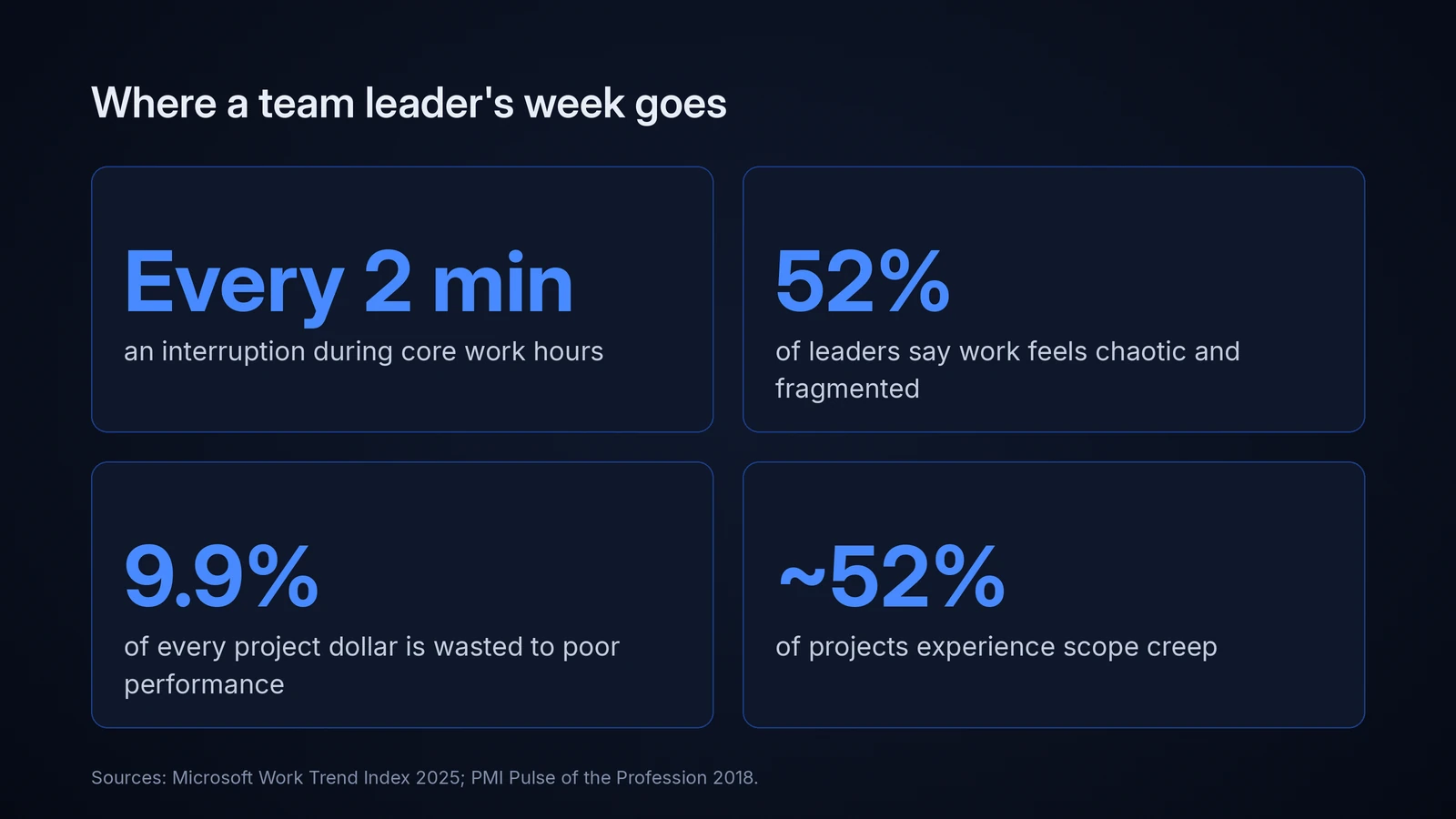
Your team isn't short on effort. It's short on uninterrupted attention. Microsoft's 2025 Work Trend Index telemetry found that employees are interrupted roughly every two minutes during core hours(https://www.microsoft.com/en-us/worklab/work-trend-index/breaking-down-infinite-workday) by meetings, emails or chats, and that 48% of employees and 52% of leaders describe their work as chaotic and fragmented.
Notice that leaders score worse. That's because you are the routing layer. Every question about priorities, every blocker, every "quick sync" passes through you, and none of it shows up as output.
The cost isn't only time. PMI's Pulse of the Profession research found that organizations waste 9.9% of every project dollar to poor project performance(https://www.pmi.org/-/media/pmi/documents/public/pdf/about/press-media/press-release/pulse-of-the-profession-2018-media-release.pdf), with roughly half of projects experiencing scope creep and nearly half delivered late. Those aren't execution failures. They're visibility failures: the problem existed, nobody saw it in time.
Back in 2019, Gartner predicted that AI would eliminate 80% of today's project management work by 2030(https://www.tcworld.info/news/ai-to-take-over-eighty-percent-of-project-management-tasks-by-2030-981), specifically data collection, tracking and reporting. Most people read that as a threat. For a team leader it's a job description rewrite: the work disappearing is exactly the work you never wanted.
Why "Just Use ChatGPT" Barely Moves the Needle
Here's what most team leads do with AI today: draft emails, summarize meetings, rewrite vague tickets. All useful. All worth a few minutes a day.
But the expensive failures in a project are rarely typing problems. They're attention problems. The task that blew up your launch was visible in the data weeks earlier, in a comment, a stalled ticket, a status update that quietly changed its tone. Nobody had time to read all of it.
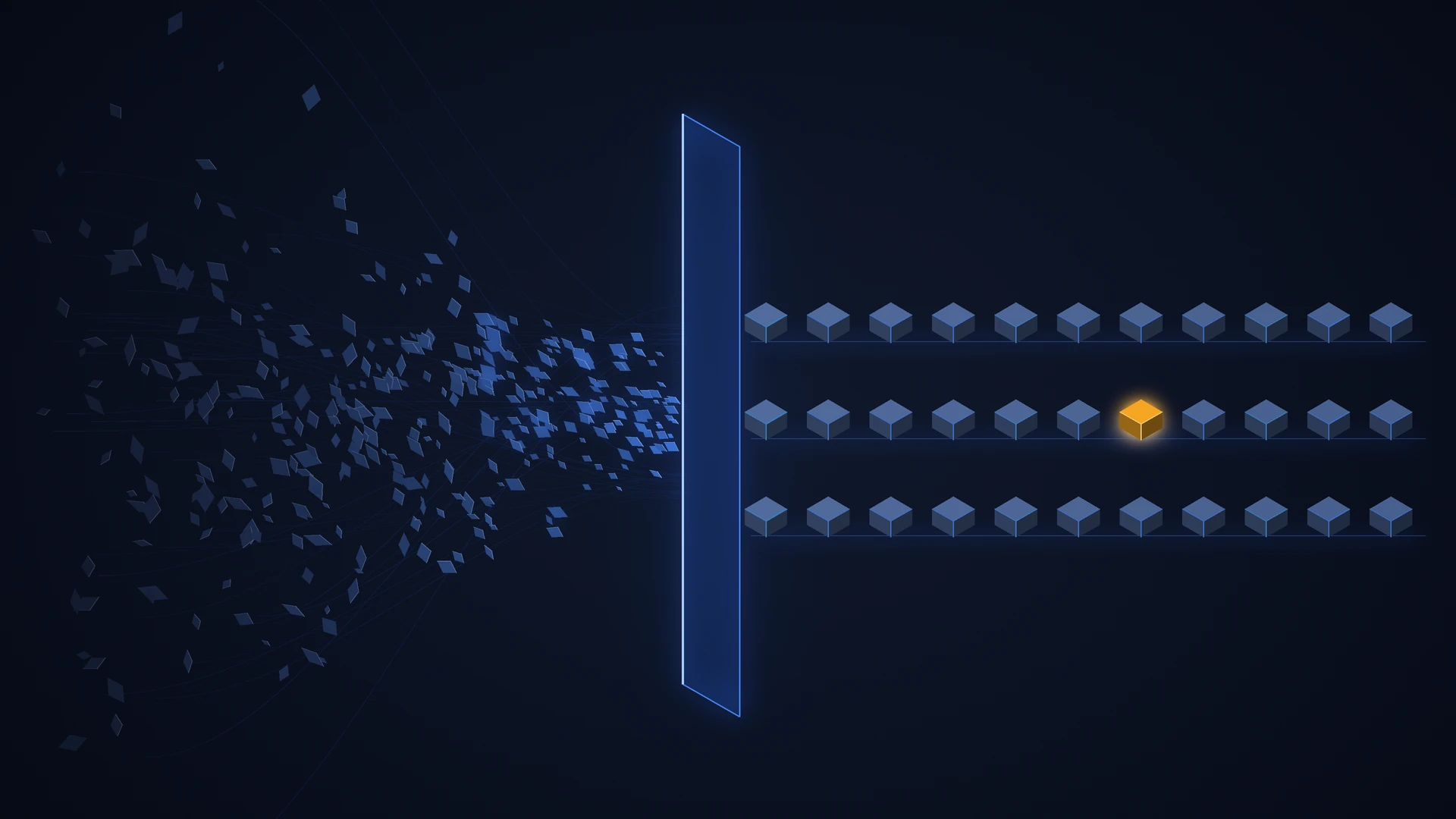
Think of AI's value in project management in three layers. The first is compress: turning noise into something short, like summaries, drafts and digests. The second is detect: finding the signals humans miss because they're buried in volume. The third is decide: sharpening your judgment calls with scenarios, trade-offs and pre-mortems, then handing the final call back to you with better information than you had.
Most leaders stop at the first layer. The time and money sit in the second and third.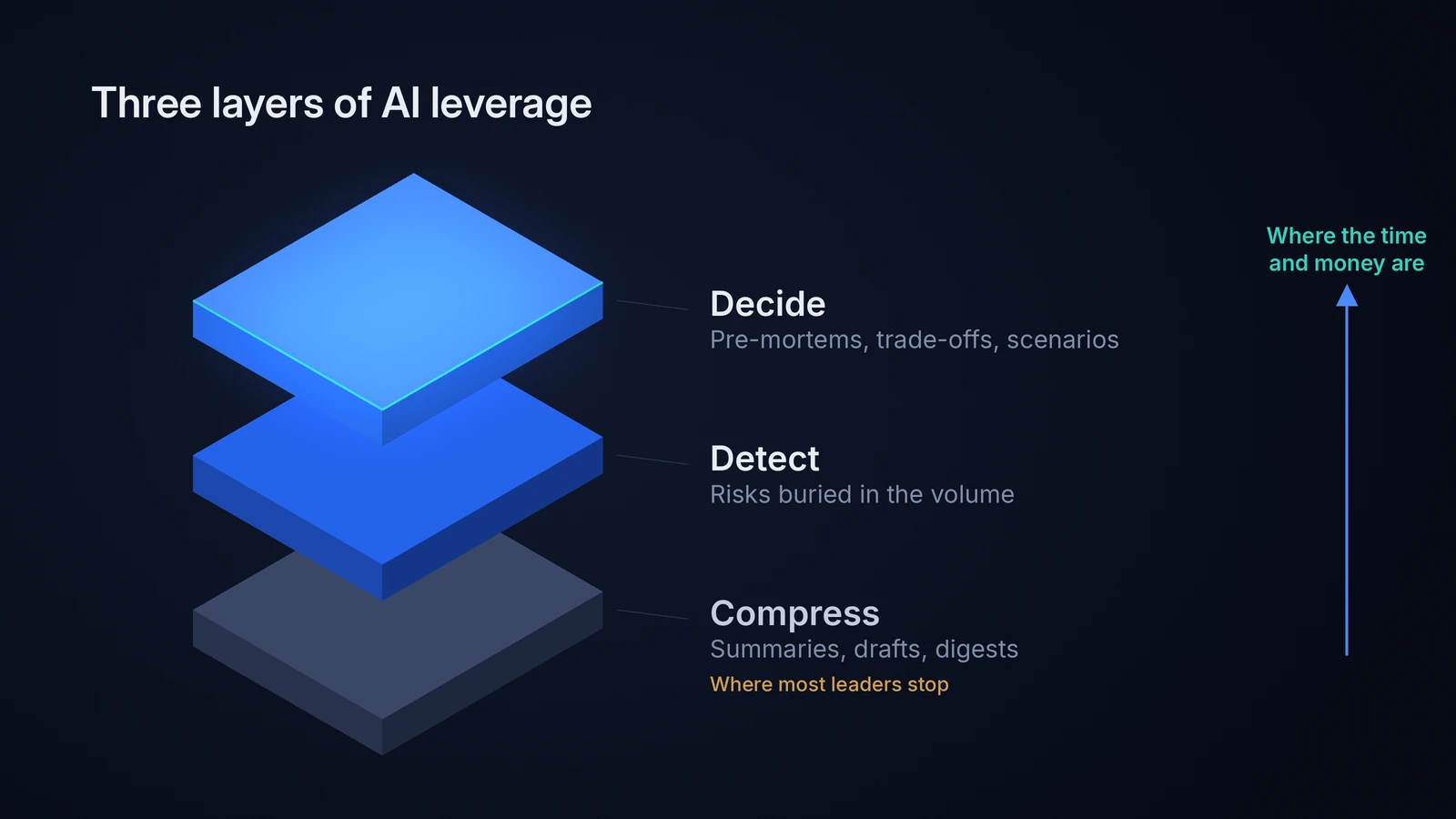
The Core Insight: AI's Edge Is That It Never Gets Bored Reading
A team lead with eight reports cannot read every ticket comment, every doc edit and every status update, every day. AI can, and it reads the 90th day with the same attention as the first.
That flips the job. Instead of asking "where are we?" and waiting for answers filtered through optimism, you get told what changed and why it matters. Stop using AI to produce updates. Use it to read them.
Every play below follows that principle.
10 Advanced AI Plays for Team Leaders
One ground rule before you start: run these on shared work artifacts (tickets, status updates, docs, meeting notes), never on private messages, and tell your team what you're doing and why. Transparency is what keeps this feeling like support rather than surveillance.
Play 1: Run a "watermelon detector" on status updates
A watermelon project is green on the outside, red on the inside. The tell is that language drifts before dates do. "Done by Friday" becomes "should be close," then "almost there," then "just waiting on one thing." Each update sounds fine on its own. The sequence is the warning.
Export the last three or four weekly updates per workstream and run this:
Below are the last four weekly status updates for each workstream. For each task, compare how its status language changed week to week. Flag any task where:
- progress claims stayed flat (e.g. "90% done") for 2+ updates
- confidence weakened ("will" → "should" → "hoping")
- a new "waiting on" or dependency appeared with no named owner. Return a table: task, owner, pattern detected, the phrases that triggered it, and one non-accusatory question I can ask the owner.
That last column matters most. It gives you a way to open the conversation without making anyone defensive. What it buys back: the two or three weeks between when a problem becomes visible and when someone finally admits it.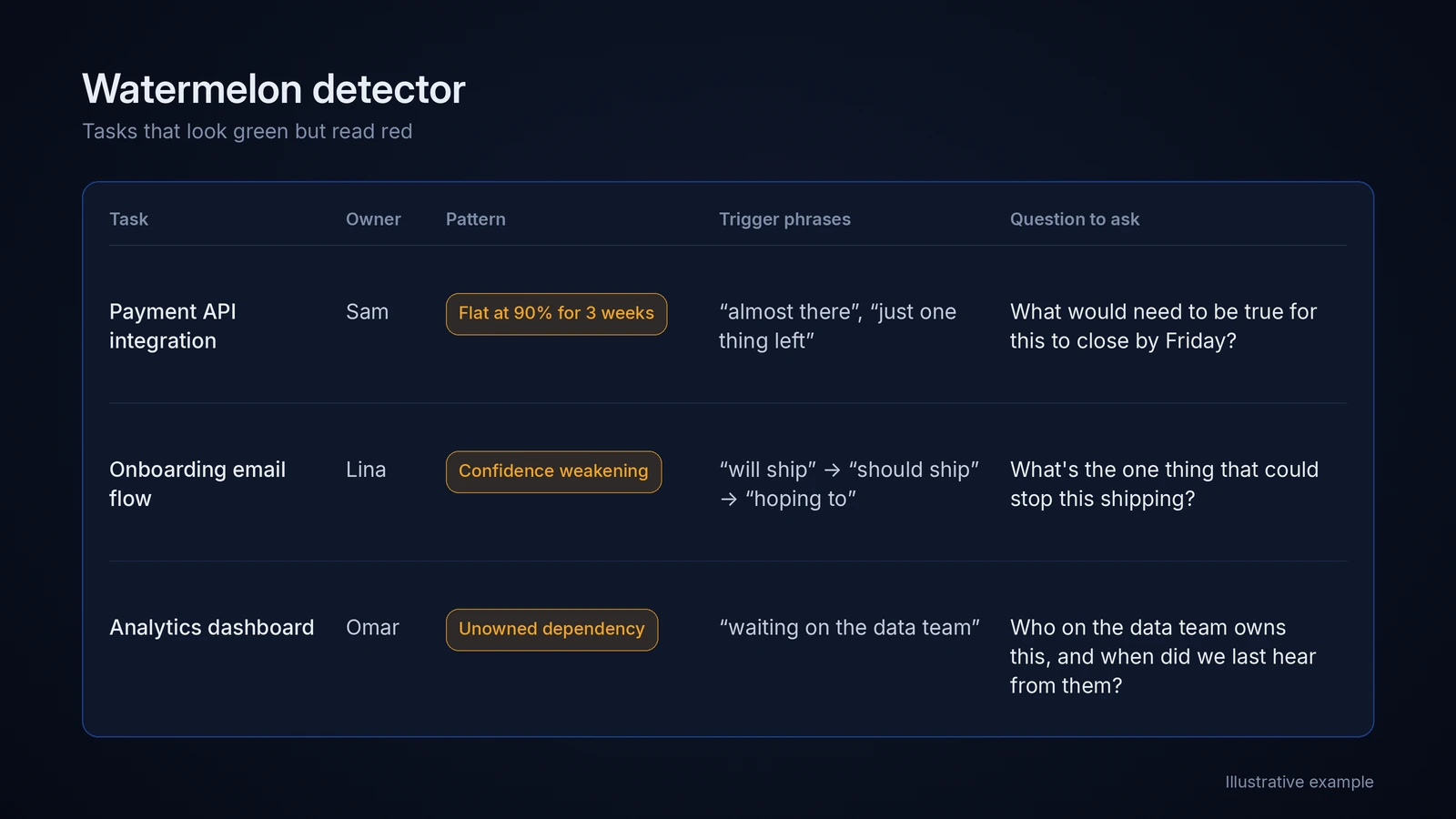
Play 2: Build estimation multipliers from your own history
In the classic planning fallacy study, students estimated their theses would take about 34 days; the average was 55.5(https://doi.org/10.1037/0022-3514.67.3.366), later even than their own worst-case guess. Your team does the same thing. The good news: the error tends to be consistent by type of work, which means it's correctable.
Export your last 40 to 60 completed tasks with the estimate, the actual time, and a task type (bug, integration, design revision, client feedback round, and so on). Ask AI to group by type, calculate the median actual-to-estimate ratio for each, and flag the types with the widest spread. Wide spread means the task needs breaking down, not padding.
Then plan with it: team estimate × type multiplier = the date you commit to. One sharp twist: the same research found people are much less biased when estimating other people's work. So have AI produce a reference-class estimate before the team estimates, and treat any big gap as a conversation.
Group by task type, never by person. Multipliers are a planning tool, not a performance metric.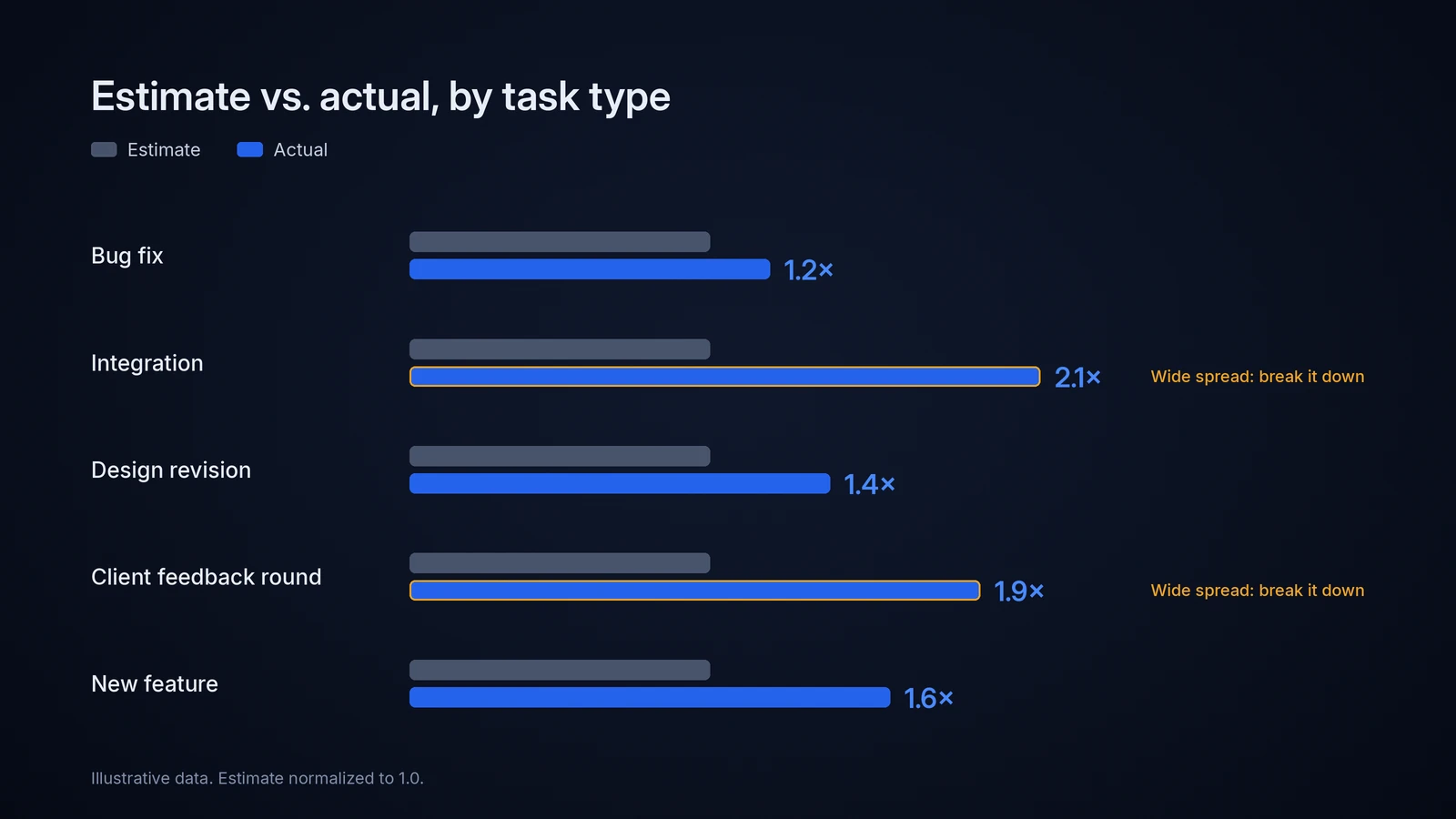
Play 3: Run an AI pre-mortem from three chairs
Gary Klein's pre-mortem asks the team to imagine the project has already failed and explain why. In his Harvard Business Review piece on the method(https://hbr.org/2007/09/performing-a-project-premortem), Klein cites research showing this "prospective hindsight" improves people's ability to identify reasons for an outcome by around 30%. AI makes it cheap and adds perspectives that aren't in the room.
Here is our project brief, plan and team structure. It is now [launch date + 60 days]. The project failed badly. Write the internal post-mortem three times:
- from the client's (or exec sponsor's) point of view
- from the most junior person on the team
- from finance .For each, list the top 3 causes of failure and the EARLIEST observable sign that each cause was already happening.
The gold is "earliest observable sign." It converts vague risks into specific tripwires. Give each tripwire an owner and a check date, and you have a risk register people actually use. For more on catching trouble early, see our guide to project risk detection with AI.(https://www.relayorchestrator.com/blog/project-management-mistakes-quietly-killing-your-team)
Play 4: The slip-one test for your critical path
Export your task list with dependencies, owners and due dates, then ask:
For each task: if it slips by 3 working days, which milestone moves, and by how much? Then list:
- tasks with zero slack
- which of those are owned by someone with 3+ other active tasks
- tasks only one person on the team knows how to do Show the dependency chain behind every flagged task.
You'll usually get a short list, three to five tasks where one bad week sinks the date. That's where your check-ins, backup plans and protection go. Everything else can run on lighter oversight.
Asking AI to show the dependency chain isn't optional. On long task lists, models can get dependency math wrong, and the chain lets you sanity-check each flag in seconds.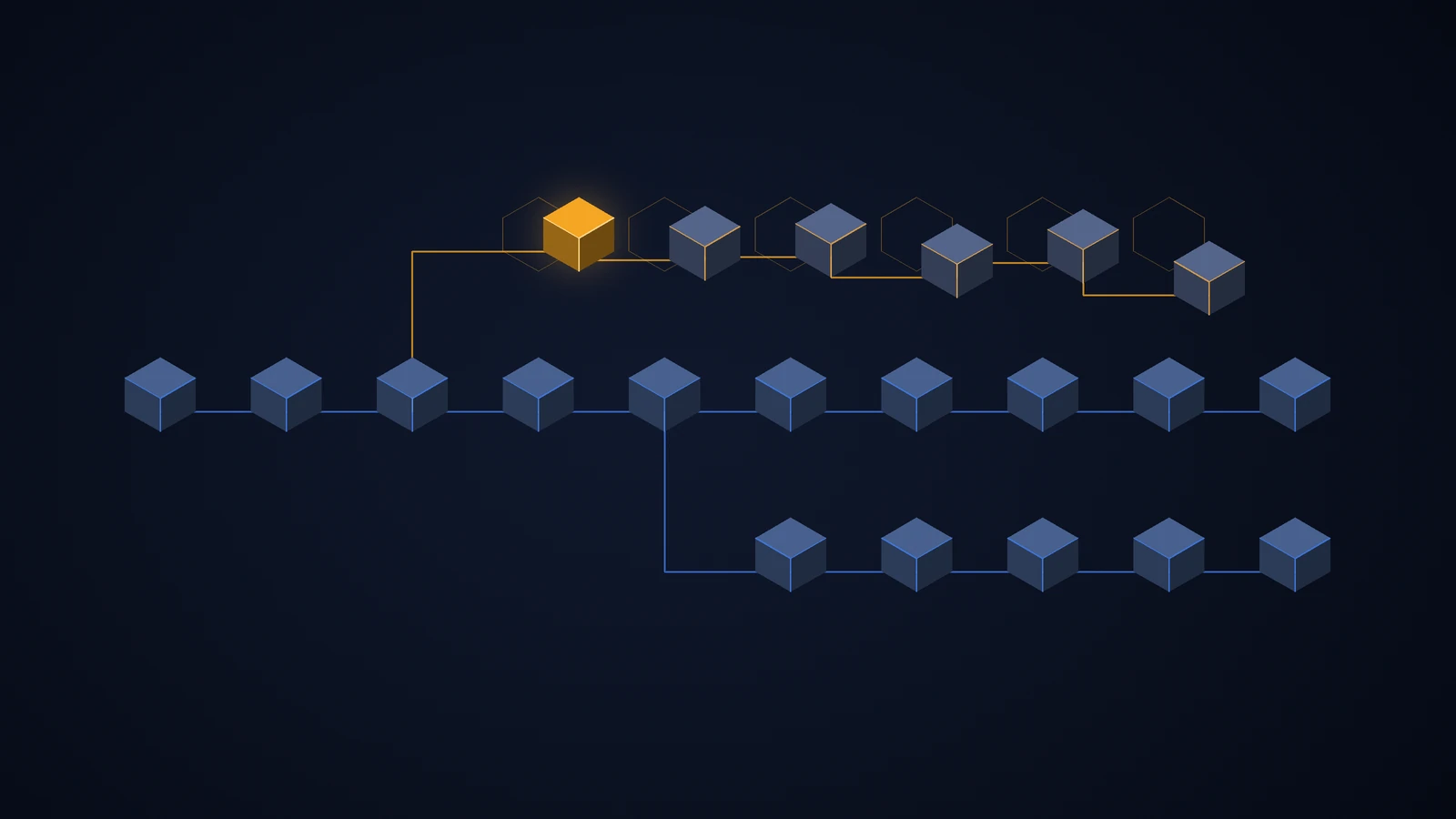
Play 5: Keep a scope drift ledger (this one is money)
If you run fixed-fee client work, scope creep isn't an annoyance. It's margin walking out the door, one "small tweak" at a time.
Every two weeks, give AI the signed scope document, the current task list and the client thread. Ask it to trace every task to a specific line in the scope, list anything it can't trace, estimate the effort on those items, and draft a neutral change-order note for each.
For internal teams, the scope document is the original brief or PRD, and the output is a trade-off conversation instead of an invoice: "We added X. What comes out?" Either way, you stop absorbing work nobody agreed to.

Play 6: Flip status reporting to "edit, don't write"
Asking eight people to write weekly updates means eight blank pages every week. Instead, have AI generate each person's draft from what already exists (closed tickets, shipped work, comments, doc edits) and ask them to correct it. Editing a draft takes a fraction of the time of writing one, and people add what the data can't show: the thing they're worried about.
Then compress upward for your stakeholders:
Turn these team updates into a 5-line update for [exec name]. Line 1: overall status in one sentence. Lines 2–3: what changed since last week that affects dates, budget or scope. Line 4: top risk and what we're doing about it. Line 5: the one decision or unblock I need, with a deadline. No adjectives. If nothing changed, say so.
"If nothing changed, say so" kills filler. Execs trust short updates more, and you get your Sunday back. If you want to go further, here's how teams run projects without status meetings at all.(https://relayorchestrator.com/articles/projects-without-status-meetings)
Play 7: Put a price on every recurring meeting
Export two weeks of recurring meetings: title, length, number of attendees. Give AI a blended loaded hourly rate for your team and ask it to calculate each meeting's weekly cost, then classify its purpose as decide, inform, align or connect.
The rules that follow are simple. "Inform" meetings become an async digest. "Decide" meetings stay, but get a pre-read and one named decider. "Align" meetings get cut in half. "Connect" meetings (one-on-ones, team rituals) get protected, because that's the human glue AI can't replace.
A price tag next to a recurring meeting changes behavior faster than any meeting-hygiene memo.
Play 8: Mine meetings for unresolved disagreements
Standard AI meeting summaries give you decisions and action items. Add two more sections, because that's where the rework three weeks from now is hiding:
From this transcript, extract:
- Decisions made (who decided, and exactly what)
- Action items (owner and due date; write "NO OWNER" if unclear)
- Concerns or disagreements raised but not explicitly resolved
- Decisions that affect someone who was not in the meeting. Keep each item to one sentence. Do not soften anything.
Items 3 and 4 are the sleepers. A concern that got talked over doesn't disappear. It comes back as a half-hearted implementation or a reopened decision.
Play 9: Find the problems your retros keep rediscovering
Paste your last six to ten retrospective notes and ask AI which issues appear three or more times, whether any of them were ever given an owner, and what changed afterward.
You'll typically find two or three recurring issues eating time and morale. The pattern to look for is recurrence without resolution. Fix one of them properly next sprint instead of logging five new ones, and your team starts trusting retros again.
Play 10: Generate context packets for handoffs
Someone joins mid-project, goes on leave, or you inherit a workstream. Feed AI the brief, the decision history, the last month of updates and the risk list, and ask for a 15-minute read covering: the goal and why it matters, key decisions and the reasoning behind them, what's been tried and failed, open risks, who knows what, and the first three things to do.
"What's been tried and failed" is the section that saves weeks. Without it, new people rerun old experiments. And you stop being the team's human wiki.
The Math: What These Plays Are Worth
Here's an illustrative model for one team: eight people plus you, a loaded cost of $55/hour for the team and $75/hour for you, and 46 working weeks a year. We're only counting three of the ten plays. of the ten plays.
Play | Hours back per | Week Weekly value
Edit-don't-write status (8 people × 20 min)| 2.7| $147
Your own reporting and deck-building (3 hrs → 30 min)| 2.5 |$188
One weekly 45-min "inform" meeting of 9 people moved async |6.75 |$386
Total | ~ 12 |~$720
That's roughly $33,000 a year for a single team from three plays. Now add the scope drift ledger: an agency running four $40,000 fixed-fee projects a year that surfaces billable creep worth 6% recovers another $9,600.
And that's before the biggest line item, the one you can't put in a table: the late project that never happened because the watermelon detector and the slip-one test caught it in week three.
To run your own numbers: hours saved per week × loaded hourly rate × working weeks, plus recovered scope value.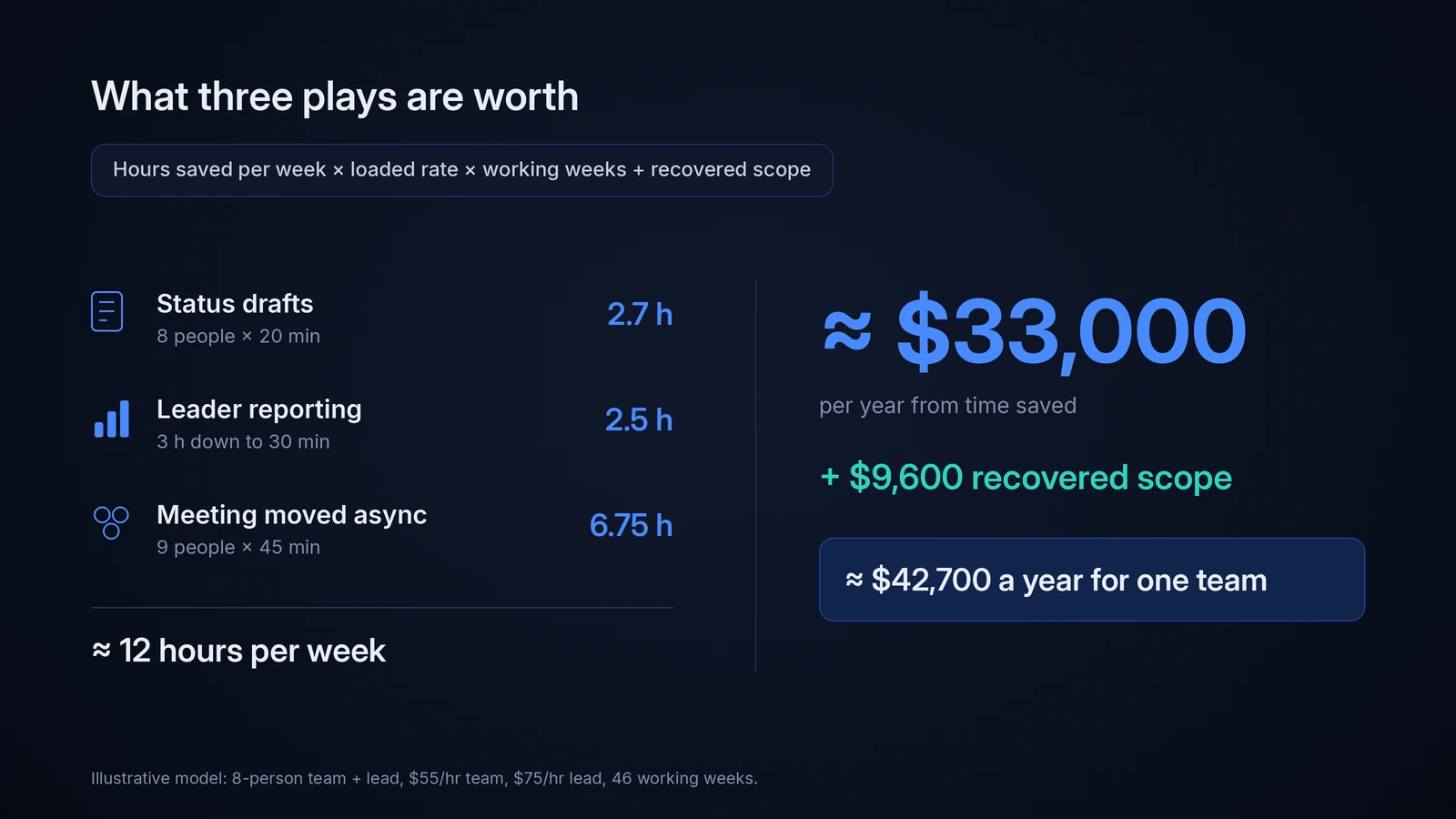
What You Should Never Hand to AI
Credibility matters here, so let's be clear about the limits.
Judgments about people. Multipliers and watermelon flags describe work, not worth. Use them in performance reviews and you'll destroy the honesty every play depends on. Hard conversations. AI can suggest the question. You ask it, ideally face to face. Final priority calls. AI can model trade-offs all day. Accountability for the call stays with you. Private channels. Scan shared artifacts, announce it, and explain why. If your team feels watched, updates get vaguer, and every play above gets worse.
From Weekly Chore to Always-On: Where Relay Orchestrator Fits
Every play in this guide works by hand. The problem is the hand. Exporting, pasting and prompting costs 20 to 40 minutes per play, per week. And the detection plays, the ones that matter most, are the first you skip when a week gets busy, which is exactly when problems are forming. A detector you run when you remember isn't a detector.
Relay Orchestrator does all of this natively, continuously, without the exports. It turns a goal into a structured plan with tasks and owners, keeps a live picture of every project, flags work that's drifting toward late before it's actually late, and delivers the digest you'd otherwise spend Sunday building. When you want to know something about a project, you ask in plain language and get an answer, not a dashboard to decode.
More than 11,390 teams run their projects on Relay and save around 15 hours a week. We're not done, either. We ship improvements constantly, shaped directly by the teams using it, because the goal was never another tool to maintain. It's a co-project manager that gets sharper every month.
What Relay won't do is make your people calls for you. That's still your job, and it should be. Relay just makes sure you're making them with the full picture, early.
If the Sunday-deck problem sounds familiar, Relay was built for exactly this. See Relay Orchestrator in action →(https://www.relayorchestrator.com/)
FAQ
How can team leaders use AI in project management?
Beyond drafting and summarizing, team leaders get the most value by using AI to read project data and surface risks: stalled tasks, weakening status language, untraceable scope, and fragile critical paths. Pair that with AI-assisted pre-mortems and estimation multipliers built from your own history.
Will AI replace project managers and team leads?
AI is taking over data collection, tracking and reporting, which Gartner flagged as the bulk of today's project management work. Judgment, prioritization, conflict and motivating people remain human, and they become a larger share of the job.
What's the fastest AI win for a team leader?
Switching status reporting to "edit, don't write" and pricing your recurring meetings. Both pay back in the first week and need no new process from your team.
Is it safe to put project data into AI tools?
Check the tool's data retention and model-training policy first, use business or enterprise tiers for client work, and limit inputs to shared work artifacts rather than private messages. Strip client-confidential details when in doubt.
How much time can AI save a team leader?
In our illustrative model, three plays recover about 12 hours a week across an eight-person team. Teams using Relay Orchestrator save around 15 hours a week.
Conclusion
The biggest shift AI brings to team leadership isn't speed. It's attention. AI for team leaders works best when it reads everything, notices what changed, and hands you the few decisions that genuinely need you.
Start with one detection play and one time-saving play this week. When you're ready to stop running them by hand, Relay Orchestrator(https://relayorchestrator.com/) runs them for you, all the time. For the bigger picture, read our complete guide to AI project management(https://www.relayorchestrator.com/blog/project-management-is-changing-are-you-still-planning-like-it-s-2015) and our breakdown of AI in project management.(https://www.relayorchestrator.com/blog/ai-in-project-management-12-advanced-plays-for-team-leaders)